How to make an overhead shot diagram
SHOTPLANS is a free overhead shot diagram maker that runs in your browser. You draw the set from above, place cameras, actors, and lights, animate the blocking, and export a PDF shot plan with a shot list and gear list. No account, no download.
What an overhead shot diagram is
An overhead shot diagram, also called a camera plot, floor plan, or blocking diagram, is a top-down drawing of a set. It shows where each camera sits and what its lens sees, where actors stand and move, where lights go, and how walls, doors, and furniture are laid out. Directors, cinematographers, gaffers, and assistant directors use it to agree on coverage, lighting, and movement before the shoot day.
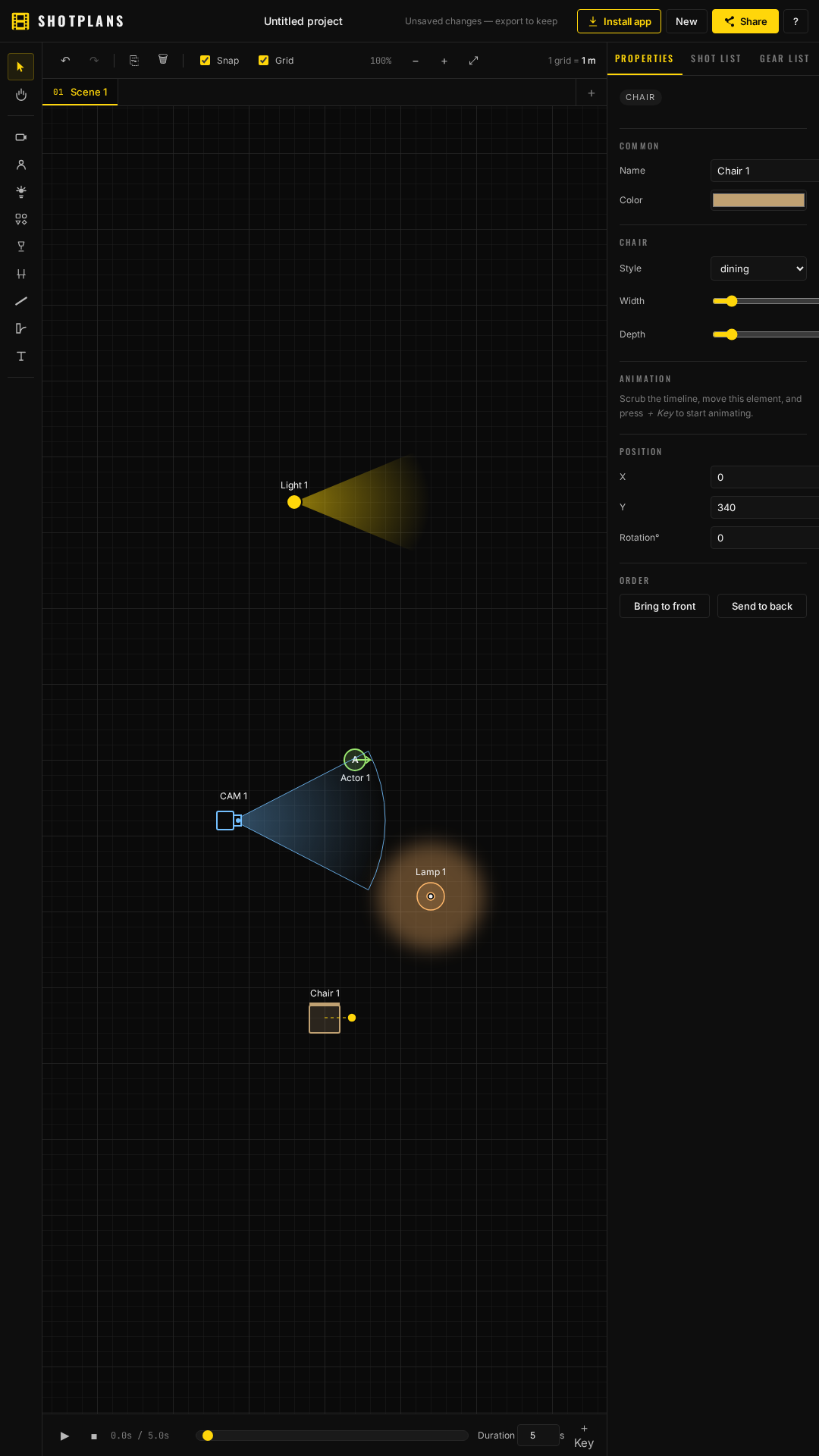
Step by step
- Draw the space. Choose Wall and drag on the canvas. Walls snap to 15° angles and grid length. Pick straight, right-angle, or curved walls, then add doors and windows.
- Dress the set. Choose Prop for furniture (dining, round, and coffee tables, sofa, armchair, bed, desk, cabinet, rug) or outdoor props (tree, potted plant, shrub, hedge, flower bed, rock). Add practical Lamps and Chairs.
- Place actors. Choose Actor and click. Type a name and rotate them to face their mark.
- Place cameras. Choose Camera, click to place, then set the lens in millimetres and the shot type (WS, MS, MCU, CU, ECU, POV, OTS, insert, establishing). The blue cone shows that lens's horizontal field of view.
- Light the scene. Choose Light and set fixture, modifier, spread, throw, intensity, colour temperature, and gel. The yellow beam shows coverage.
- Animate the blocking. Select an actor, camera, or light, press Record move, and drag it while the timeline runs. Press Play to watch it back. A dashed path marks each move.
- Export and share. Open Share to download a PDF or PNG, print, email, text a link, or save the editable
.shotplan.jsonfile.
Use the scene tabs above the canvas to plan several setups in one project.
Lens and field of view reference
SHOTPLANS draws each camera cone from the horizontal angle of view of a 35mm full-frame sensor (36 mm wide): angle = 2 × arctan(36 ÷ (2 × focal length)).
| Lens | Horizontal angle of view | Typical use |
|---|---|---|
| 18 mm | 90° | Wide establishing, tight rooms |
| 24 mm | 74° | Wide shots, interiors |
| 35 mm | 54° | Medium-wide, walk-and-talks |
| 50 mm | 40° | Medium shots |
| 85 mm | 24° | Close-ups, portraits |
| 135 mm | 15° | Tight close-ups, compression |
Keyboard shortcuts
V select · H pan · C camera · A actor · L light · P prop · M lamp · K chair · W wall · D door · T label · R rotate · [ ] light spread · Ctrl/Cmd+Z undo · Ctrl/Cmd+S save project file · ? all shortcuts.
Frequently asked questions
Is SHOTPLANS free?
Yes. SHOTPLANS is free to use in any modern web browser, with no account, sign-up, or ads.
Do I need to create an account?
No. SHOTPLANS saves your project on your own device automatically. To keep a copy or move it to another device, use Share → Save project file.
How does SHOTPLANS calculate the camera field of view?
The camera cone uses the horizontal angle of view for a 35mm full-frame (36 mm wide) sensor: 2 × arctan(36 ÷ (2 × focal length)). A 35mm lens shows about 54°, a 50mm lens about 40°, and an 85mm lens about 24°.
Can I make a lighting plot?
Yes. Place lights and set fixture name, modifier, beam spread, throw distance, intensity, colour temperature in Kelvin, and gel. Practical lamps come in table, floor, wall, pendant, sconce, neon, and candle styles with an optional glow.
Can I animate actor and camera blocking?
Yes. Select an actor, camera, or light, press Record move, and drag it while the timeline plays, or add keyframes manually with + Key. A dashed motion path shows the move.
Does SHOTPLANS make a shot list and gear list?
Yes. Every camera becomes a shot in the Shot List tab, with lens, field of view, and editable notes. The Gear List tab totals camera bodies, lens sets, focal lengths, lighting fixtures, modifiers, and props across all scenes, and can be copied as text.
What can I export?
PDF and PNG images of the current scene, a printed page, and the editable .shotplan.json project file. The Share menu can also open your email or text messages.
Does it work offline or on a phone?
Yes. SHOTPLANS works on desktop, tablet, and phone browsers with touch and pinch-zoom, and can be installed as an app. After the first visit it opens offline. PDF export needs a connection the first time to load the PDF library.
Who makes SHOTPLANS?
SHOTPLANS is made by FilmLV, a film production company in Henderson, Nevada. Contact [email protected].